
XenGenTR - Forum Statistics + English Patch
[XenGenTr] Forum isstatistik sistemi V4Our plugin that you will use to list your forum topic content in certain criteria. Now we offer you an option that can be used royalty-free and can be purchased.
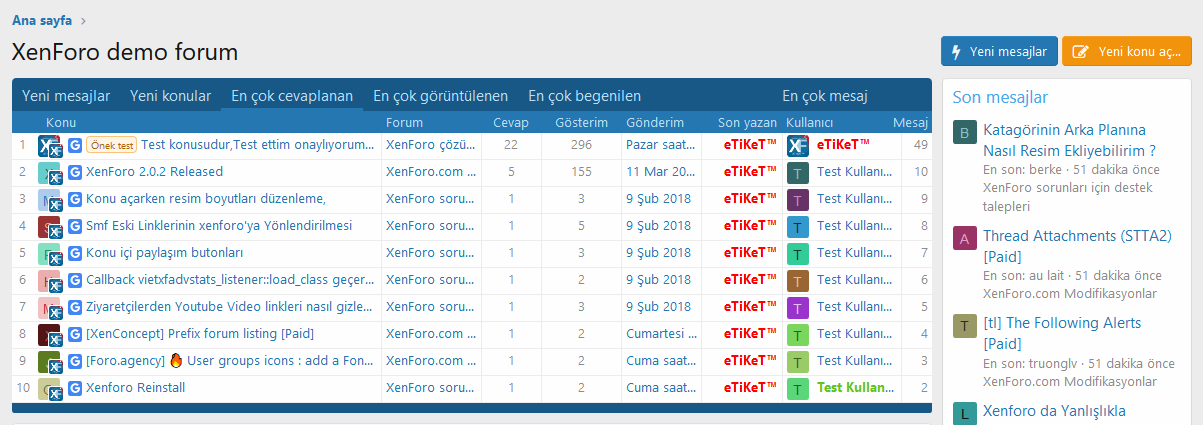
️ List the last posts in the forum with the new posts tab.
With this tab, you can list the topics in which the last message was written in that forum(s) by pulling data in the forum you want.
- With this tab, you can focus on a forum(s) by pulling data in the forum you want. For example: VIP Recently written messages, you can get a remarkable tab by editing the tab name accordingly.
- You can add as many tabs as you want and use them with different titles .
 You can list the latest topics opened in the forum with the new topics tab.
With this tab, you can list the topics that have been opened in that forum(s) by pulling data in the forum you want.
- With this tab, you can also provide various focusing. For example: Recent commercial topics, you can get a remarkable tab by editing the tab name accordingly.
- You can add as many tabs as you want and use them with different titles .
You can list the topics that receive the most messages in the forum;
With this tab, you can list the topics that receive the most messages in that forum(s) by pulling data in the forum you want.
- With this tab, you can also provide various focusing. For example: Commercial topics that receive the most messages, you can get a remarkable tab by editing the tab name accordingly.
- You can add as many tabs as you want and use them with different titles .
You can list the most liked topics in the forum in the most reacted topics tab;
With this tab, you can list the topics that receive the most likes in that forum(s) by pulling data in the forum(s) you want.
- With this tab, you can also provide various focusing. For example: Our most liked topics, you can get a remarkable tab by editing the tab name accordingly.
- You can add as many tabs as you want and use them with different titles .
Most viewed topics tab, you can list the most viewed topics in the forum;
With this tab, you can list the topics in the most viewed area in that forum(s) by pulling data in the forum you want.
- With this tab, you can also provide various focusing. For example: The most displayed commercial topics, you can get a remarkable tab by editing the tab name accordingly.
- You can add as many tabs as you want and use them with different titles .
Follow all the resources added to the forum instantly with the topic resources tab;
With this tab, you can facilitate the follow-up of the sources by extracting data from the source category(s) you want.
- You can add as many tabs as you want and use them with different titles .
 Users area with the most likes.
This is an area where only the most liked users are listed.
Authorization;
- Show/hide statistics in desired user groups
Options;
- Options to use on various topics or on our own location.
- Content display limit.
- Turn on/off auto content refresh
- Auto refresh timeframe.
- Turn auto-renew on/off in visitors.
Theme features;
With this field, you can now configure your statistics according to your theme as you wish.
- Tab tab icons enabled - toggle
- Data list - Google search button enabled - toggle
- Data list - Enable user online status - toggle
- Data list - Last post user's avatar active - toggle
- Data list - Content detail icons enabled (question, article, resource) - toggle
- Data list - Time active - toggle
- Data list - Content forum active - toggle
- Data list - Message count enabled - toggle
- Data list - Last post active - toggle
- Collapse system active - toggle
Scrollbar customization ;
- Completely confidential
- Show when hover over hide
- Always show
User statistics ;
-User statistics enabled - toggle
-User statistics field location
-- Position in left block
-- Position in right block
And you can provide control and color control of many areas like these.


