

- Joined
- Feb 5, 2024
- Messages
- 3,473
- Reaction score
- 8,174
- Points
- 113
- Website
- esso4k-tv.com
- vip
- 8,875 credits
Offline
This function is returning a String it has called from the Shared Object Library loaded on run-time of the app. What we can do instead of editing the Lib using tools like BinaryNinja is to simply replace the method with a normal Java method (in Smali of course) which does the exact same but we are able to control from MT Manager, here is a look at the code we are going replace this App Name function with (in this tutorial):
Note: this replacement method is for use with the rest of this tutorial as we will be adding the appname()Ljava/lang/String; function too the Config.smali class later down the line.
Moving on we would need to simply replace the remaining Native methods with the respective functions we have made to be able to stop the XCIPTV app from reading from the Shared Object Library and just... do as we say.
For this tutorial complete this list of Search and Replace with:
And this would allow you to then change the Version Code of the app yourself - but why? Regardless this is how you would achieve this, see the list above for example data that would be used in the return statement for these functions.
The last major changes to the app should be to remove any force-closing of the application you can do this by searching for:
Landroid/app/Activity;->finishAffinity()V
and removing all instances of this from the xciptv package in the app, Just select and delete or place # in front to comment out.
In case you got confused with the explanations of how to do this here is a quick Video explaining it:
Step five; Configuring the Config
In this final step of the tutorial I will attempt to give an overview and explanation of replacing the Native calls to the Library with your own functions as to be able to connect to your own private API and for Rebranders be able to change the App Name and Package name of the application for your customers.
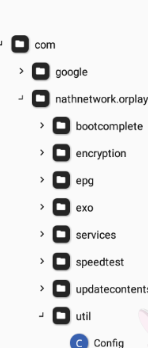
We firstly want to navigate to the Config.smali class which can be found by opening Classes2.dex and navigating the file system to com/nathnetwork/orplayer/util/
You will notice at the bottom of the class there a bunch of Native functions:
These are called only within this class (apart from what we have added in step four) and we can just replace the methods with methods that allow us to do our own thing.
As far as I am aware the current method naming scheme in Config.smali hasnt changed since they moved to Native calls so you are able to Copy and Replace the following Class and replace the entirety of your class
HTML:
You must log in to view
(7 lines)
Note: this replacement method is for use with the rest of this tutorial as we will be adding the appname()Ljava/lang/String; function too the Config.smali class later down the line.
Moving on we would need to simply replace the remaining Native methods with the respective functions we have made to be able to stop the XCIPTV app from reading from the Shared Object Library and just... do as we say.
For this tutorial complete this list of Search and Replace with:
HTML:
You must log in to view
(7 lines)And this would allow you to then change the Version Code of the app yourself - but why? Regardless this is how you would achieve this, see the list above for example data that would be used in the return statement for these functions.
The last major changes to the app should be to remove any force-closing of the application you can do this by searching for:
Landroid/app/Activity;->finishAffinity()V
and removing all instances of this from the xciptv package in the app, Just select and delete or place # in front to comment out.
In case you got confused with the explanations of how to do this here is a quick Video explaining it:
Step five; Configuring the Config
In this final step of the tutorial I will attempt to give an overview and explanation of replacing the Native calls to the Library with your own functions as to be able to connect to your own private API and for Rebranders be able to change the App Name and Package name of the application for your customers.
We firstly want to navigate to the Config.smali class which can be found by opening Classes2.dex and navigating the file system to com/nathnetwork/orplayer/util/
You will notice at the bottom of the class there a bunch of Native functions:
PHP:
You must log in to view
(21 lines)
These are called only within this class (apart from what we have added in step four) and we can just replace the methods with methods that allow us to do our own thing.
As far as I am aware the current method naming scheme in Config.smali hasnt changed since they moved to Native calls so you are able to Copy and Replace the following Class and replace the entirety of your class

Attachments
Last edited:


