

Streamity v2 IPTV Player Xtream v2.6
Installation
- Download latest release (streamity-v2.X.zip)
- Open with a text editor (for example notepad++) config.js and complete empty fields ( window.dns). More instructions are available inside the file.
- Open with a text editor (for example notepad++) config.php and write your mysql database info (database url, database name, username, password) and epg xml url. (if you don't use epg you can skip part 2 and 3)
- Import "sql_table.sql" in your mysql database (if you are using phpMyAdmin click on "import" -> select the sql_table.sql and click on execute)
- [OPTIONAL] Open with a text editor (for example notepad++) config.css if you want to change main color and background one.
- [OPTIONAL] Change favicon.ico and img > banner_w.png
- Copy and paste all the files in your server. Use the root folder, like domain.com (don't use folders like domain.com !)
Installation in sub-folder (ex:
Copy the "static" folder in your root folder and all the other files in /player/To avoid wasting server resources, epg update will be triggered when an user login and database has less than 12 hours of programmes.
Official Streamity.tv website:
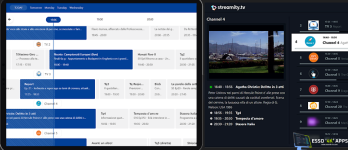
Streamity is an online webplayer. Watch IPTV Channels, movies TV series online on your browser with no additional software required!DISCLAIMER: Streamity is a player. No stream or movies is included. Pictures are just for demo purpouse.
Features
- Xtream Api support
- Customizable name and logo
- Modern design and smooth animations
- EPG Viewer
- 12h/24h EPG time format support
- Pic in picture player
- Automatic fix and improve movie and series name
- Favorites
- Continue to watch for vod and series
- Automatic select next series episode
- React js





![NexTv Player v3.2.7 | [Unlocked]](/data/resource_icons/1/1001.jpg?1736962030)


